
A Step-by-Step Look at How My Daughter Mastered Her Week 1 Vocabulary
Last week, my daughter started EZRead’s AI Learning Path and picked vocabulary as one of her focus areas. She learned a handful of new words—but learning them once isn’t enough. That’s where Week 2 came in.The Learning Path had her take all those Week 1 vocabulary words into the Morphology Builder. Instead of just memorizing definitions, she’d break each word apart to understand why it means what it does. Here’s exactly how it works.
Step 1: The Word Mastery Lab
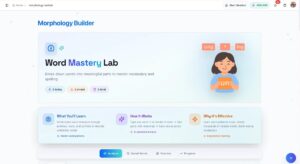
When she opens the Morphology Builder, she lands on the “Word Mastery Lab.” Right away she can see her progress: words analyzed today, her current streak, and total words mastered. It sets the tone—this is her space to explore.
Step 2: Type Any Word

She types in one of her vocabulary words and hits “Analyze Word.” The AI gets to work. There’s also a Daily Goal tracker at the top—she’s set hers at 10 words per day, and watching that progress bar fill up keeps her motivated.

If she’s not sure where to start, there’s a Quick Start section with words sorted by difficulty: Common (Easy), Academic (Medium), and Challenging (Hard). Great for days when she wants to try something new.
Step 3: Watch the Word Build
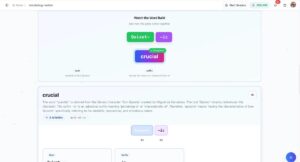
This is the cool part. The screen shows an animation of the word breaking into pieces—prefix, root, suffix—then coming back together. For “quixotic,” she saw “Quixot-” (the root, from Don Quixote) and “-ic” (meaning “having the nature of”). Below that, the AI explains the full meaning and origin story.
Step 4: Explore the Word Family


Next comes a mind map showing related words—nouns, verbs, adjectives, adverbs—all connected to the same root. She can click on any word to see its definition and an example sentence. There’s also a Rhyming Words section that helps with pronunciation. She loved discovering that “quixotic” rhymes with “exotic” and “chaotic.”
Step 5: Practice What She Learned
After exploring, she heads to the Practice tab. Five questions test what she just learned, and they come in different types:
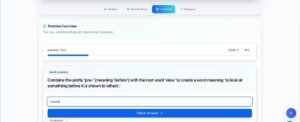
Build Questions ask her to combine parts into a word. “Combine ‘pre-‘ with ‘view’ to make a word meaning ‘to look at something before it’s shown.'” She types “preview.”
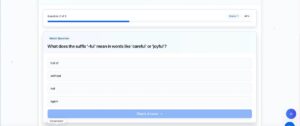
Match Questions are multiple choice. “What does ‘-ful’ mean?” She picks “full of.”
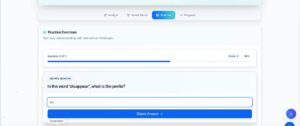
Identify Questions have her find the word part. “What’s the prefix in ‘disappear’?” She types “dis.”
Step 6: See Her Results

When she finishes, a results screen shows her score, accuracy percentage, and time. Her last session: 4 out of 5 correct, 80% accuracy, done in under 3 minutes. That green checkmark and “Great job!” message? She lives for it.
That’s the Morphology Builder—and honestly, watching her get excited about word parts was not something I expected. She’s not just memorizing anymore. She’s figuring words out like little puzzles. And the best part? This confidence is carrying over into her reading. Next week, we’re tackling the Fluency Builder. I can’t wait to see what happens.
Next week: the Fluency Builder. Stay tuned.